Classroom Lab Scheduler
Overview
Objective: Save the company money by designing a console for teachers that gives the ability to schedule multiple labs at specific times in advance for their whole class or individual students. Give them the ability to cancel any or all labs at any given time. Give the teacher relaunch capabilities for failed launched labs. Prevent unnecessary lab spin up to avoid the business spending extra money on failed and unused labs.
Problem statement: Teachers and students have a long wait time to get into their labs and there is also a lack of lab availability. It is difficult to get all the students to attend the labs which wastes teacher’s and student’s classroom time to complete the lab activity. These labs get spun up at specific class times whether they are utilized or not. Unused labs become a “wasted lab” costing money for the business providing the labs.
Role: Designer, Researcher

Inspiration
Design inspiration came from other EdTech platforms that utilize scheduling for other purposes and from common calendars. I.e. Teams, google calendar, online teaching platforms. We know these are platforms which the teachers are familiar with based on previous research that the company provided.


Early Prototype Iteration
Early iterations involved user testing to see if placement made sense to the user. There was also playing around with colors in terms of company branding. We also wanted to know what terminology spoke best to the users.

Usability Testing
There were 3 rounds of 5 user testers on different iterations of the design. Caveat the users were not active teachers, but they were internal employees who used to be teachers. They once taught the same type of classes and labs when they were teachers. These company employees were teachers within the past 2-3 years. The company didn't have access to the most current users within the scope.
All users agreed that a calendar type of design made the most sense to keep track of their classroom and student labs. They also elaborated on the look and feel of the design.
.png)
Final Iteration
Key learnings: After a few rounds of usability testing we were able to finalized the branding in terms of what made sense to the company, the user, and accessibility compliance.
Clicked a block in the main calendar to schedule a lab.
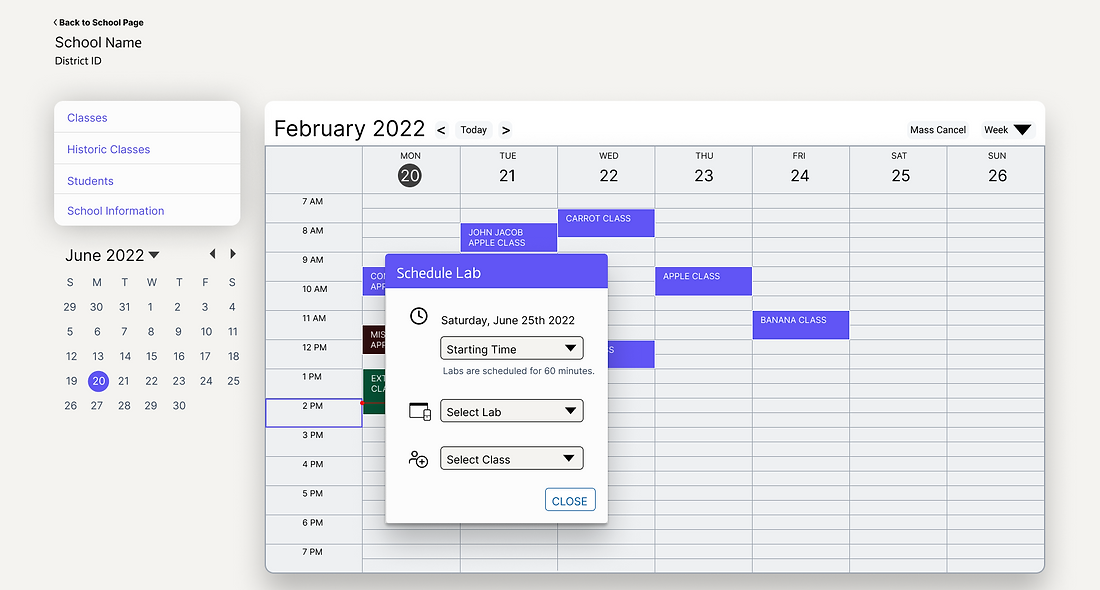
Clicked to see details of a scheduled lab.

Clicked the "change lab participants" button in the scheduled lab details modal to select and change which students will have a scheduled lab.

Scheduled 4 individual students into one time block.

Clicked into a scheduled lab to decide if there's a need to cancel a lab based on current class attendance.

Checked to see which students missed their scheduled lab.

Retrospective
Limitations and constraints: The company was between contracts and undecided on whether they wanted to design a complete website from scratch or purchase an out of the box website.
Solutions: Had the top stakeholders agree for this product experience that they would break their existing code for this design as long as the specific change was within scope.
Next steps: Continue to follow up on user feedback since the product has been live in order to see where we can continue to improve the experience.